What Is Instagram SEO?
Table of Content
Table of Contents
The process of improving your Instagram profile and content to increase your visibility on the platform is known as Instagram SEO.

In other words, using a range of strategies to enhance your Instagram presence enables you to appear in user feeds, Explore, Reels, and Instagram search results—all without having to spend money on advertisements. If someone types “Marketing” into the Instagram search bar, for instance, they can receive results for various hashtags, accounts, and/or captions.
Knowing how to do Instagram SEO is important because a lot of things you do to increase your Instagram presence might also increase your visibility on more conventional search engines, such as Google. Knowing how Instagram operates and how it chooses which material to display in search results is crucial if you want to get the most out of Instagram SEO.
How does Instagram SEO work?
Instagram SEO includes algorithms that are intended to match you with users who are interested in companies similar to yours and/or the kinds of content you produce. Instagram CEO Adam Mosseri claims that the company considers three primary criteria for determining what shows up in search results:
- Search text: What people type into the search field is the most crucial element. Instagram uses usernames, bios, captions, hashtags, and locations to match these keywords.
- User activity: Instagram tailors results according to users’ followed accounts, seen posts, and previous interactions (likes, comments, and shares).
- Post popularity:- accounts, or hashtags are more likely to rank highly in search results if they have a large number of likes, comments, shares, and followers
How to do Instagram SEO and Increase Your Visibility on Instagram and Google
Several Instagram SEO strategies, such as the use of pertinent keywords, are also beneficial for Google SEO.
Let’s review some Instagram SEO strategies that will help you connect with your target market.
1. Optimize Your Profile with Keywords
Because it helps the platform understand the purpose of your account, Instagram takes into account keywords used in important sections such as your handle, profile name, and bio.
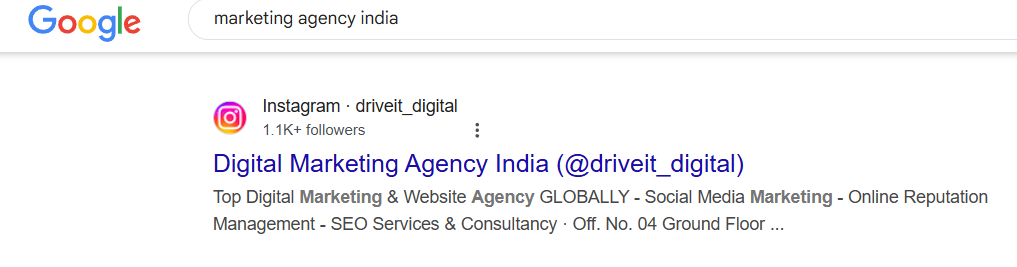
When someone searches for “marketing agency india” for instance, the top profiles frequently contain the keywords “Digital Marketing,” “Marketing,” and “India.”
You may also increase your visibility in Google search results by using keywords in this manner. especially for queries that are branded.
Exactly like this:
2. Include Keywords in Your Hashtags and Captions
Depending on the user’s interests and your own engagement signals, adding appropriate keywords to your captions improves Instagram’s comprehension of your material and raises the possibility that it will show up in search results and perhaps other app sections.
Adding keywords into hashtags can also be beneficial, mostly because it allows the platform to classify your material and match it with individuals who are looking for particular subjects.
Finding the appropriate keywords to utilise can be done by:
Examining your competition: Examine the captions of accounts in your field to find out which posts generate the most engagement and what keywords they utilize.
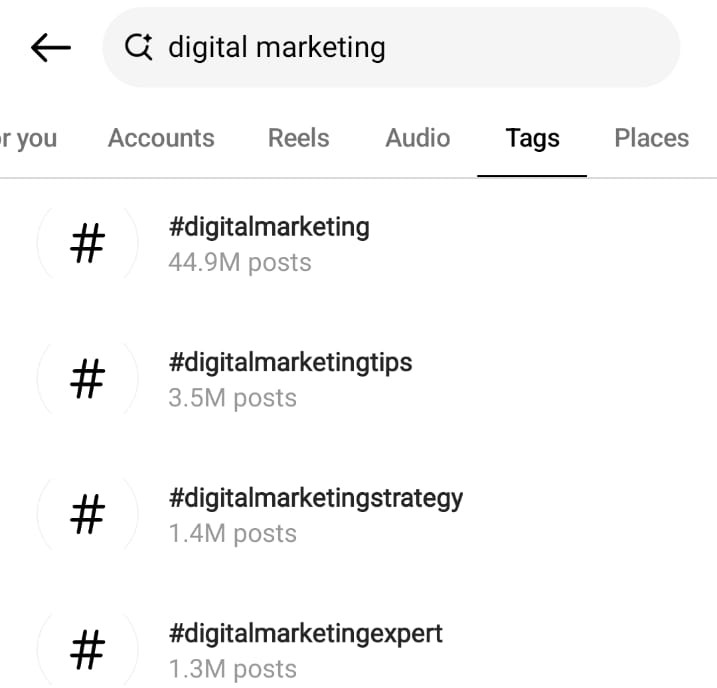
Using the search bar on Instagram: To uncover popular keywords, type a topic (for example, “Digital Marketing”) into the search field and examine the profiles, hashtags, and suggested terms. To learn more about hashtags in depth, use the “Tags” tab.
Regarding hashtag usage, the creator community account on Instagram suggests that you:
Instead of overusing hashtags in your postings, concentrate on using three to five pertinent hashtags.
Use a combination of general hashtags (like #DigitalMarketing) and specialised ones (like #digitalmarketingtips).
For Instagram’s algorithm to recognise hashtags more effectively, put them in the caption instead of the comments.
Pro tip
Whenever possible, use hashtags and keywords in your caption rather than in the comments. to make sure Instagram takes note of them when evaluating and prioritising the content you upload.
3. Give Your Videos Subtitles
In addition to allowing you to insert keywords that can catch viewers’ attention while they scroll, subtitles make it easier for visitors to watch your reels without sound. Subtitles can boost likes, comments, and shares by making your movies more interesting and approachable, even though they don’t directly increase views.

Over time, more individuals may see your material thanks to this additional involvement.
Here’s how to use Instagram to add subtitles:
- Make a reel first, then tap the sticker symbol.
- After that, choose “Captions,” and Instagram will create subtitles on its own.
- Verify the subtitles and make any necessary corrections (by tapping on the text) to ensure that they accurately reflect your material.
An excellent place to start is with Instagram’s automatically produced subtitles. However, if you want more customization, you can use apps like Veed.io or CapCut.
With the help of these programs, you can customise the fonts, colours, and animations of your subtitles to improve their visual impact and brand consistency.
4. Include alt-text in your posts.
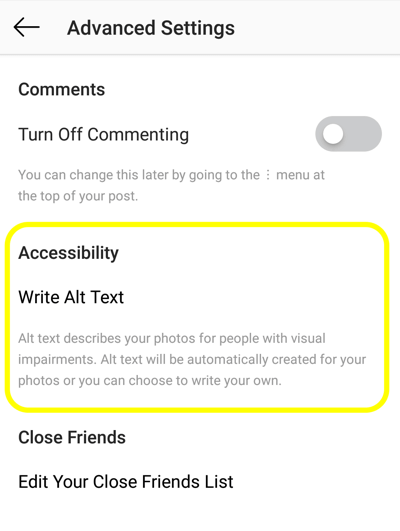
A brief description of a picture or video that explains what it’s showing is called alternative text, or alt text. This helps your content show up in Google searches and makes it accessible to people with visual impairments. This is an illustration of how a post may show up in Google’s image results:
The best method to improve your Google visibility is to write alt text that is packed with keywords.
For Instagram, to add alt text:
- Click the three dots in the top corner of the post you wish to change, then choose “Edit.”
- Next, choose “Edit Alt Text.”
- Save it after adding your copy.
When writing alt text, remember to be concise (no more than 125 characters) and specific (e.g., “Digital Marketing Agency In India”).
5. Keep Your Theme Consistent
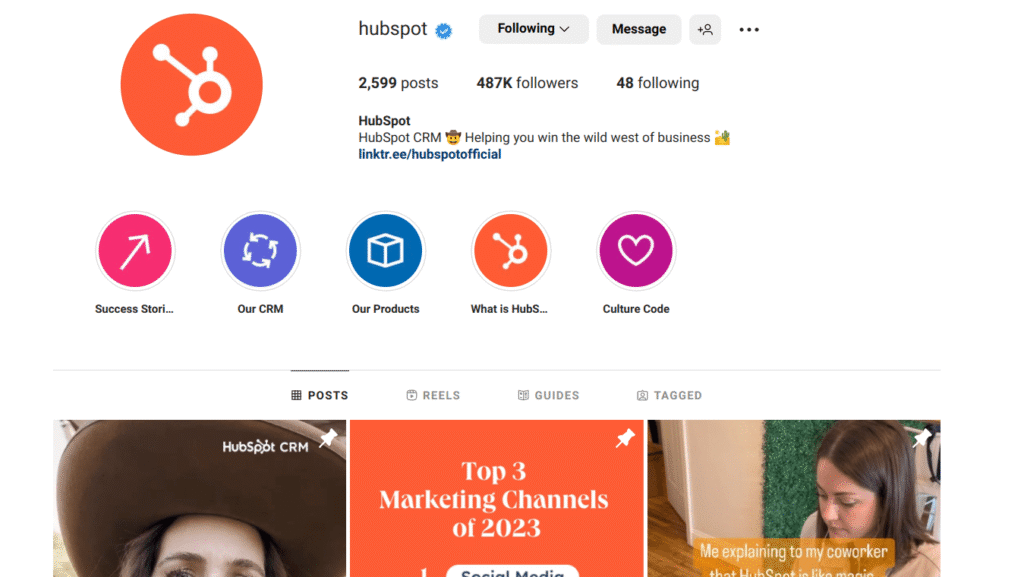
One of the top marketing platforms, HubSpot, keeps its Instagram profile’s design and content themes consistent. They make use of branding colours like orange and blue, simple drawings, and carousel articles with quotes, relatable memes, and short marketing advice aimed at business owners and marketers.
Followers start to connect that visual identity with HubSpot when they see these posts in the same manner over and over again. Because it feels like HubSpot, the content—whether it’s a lead generation advice or a meme about email marketing—stands out in the feed.
In addition to increasing brand recognition, this consistency promotes greater interaction, which tells Instagram’s algorithm to show HubSpot’s posts to more people.
6. Post at Correct Times.
Posting at the times when your followers are most active may help you receive more likes, comments, and shares, even if Instagram doesn’t display content based only on when it was uploaded.
This interaction increases the likelihood that your content will show up elsewhere by telling Instagram’s algorithm that it is valuable.
The top and worst hours, days, and times for businesses to post on Instagram are as follows, per Co-Schedule research:
- 9:01 a.m., 7:59 p.m., 9 a.m., 8 p.m., and 7:59 a.m. are the best times.
- 9 a.m., 8 a.m., 10 a.m., 12 p.m., and 3 p.m. are the best times.
- 2 a.m., 3 a.m., 4 a.m., 11 p.m., and 5 a.m. are the worst times.
- Tuesdays, Fridays, and Wednesdays are the best days.
- Thursdays, Saturdays, and Sundays are the worst days.
The ideal time to post will vary based on your audience and niche, so it’s crucial to try new things and evaluate your interactions.
You can start learning new things with your Instagram account. From your profile, pick the “Professional dashboard” option.
7. Keep Your Reels Clear of Watermarks
Reels with visible watermarks from other platforms are less likely to show up in recommendations or on the Explore page, according to Instagram, which prefers to highlight material that seems native, so it’s better to leave them off.
If you utilise a paid editing program that doesn’t require a watermark or produce material within Instagram, this is simple to accomplish. Use programs like CapCut to get rid of watermarks from your own content before posting it to Instagram if you’re recycling it from sites like TikTok.
As long as the final version published to Instagram is watermark-free, Mosseri points out that using third-party tools to create content won’t have a detrimental impact on your reach.
8. Prioritize Engagement with Your Audience
The exposure and performance of your content on Instagram can be increased by taking all reasonable steps to increase engagement.
After all, the amount of interaction that individuals and others have with you and your material determines how frequently they view your postings.
- Instagram offers the following advice on how to boost engagement:
- Make material that is genuine and relatable: In the initial three seconds, capture users’ attention.
- Make use of excellent images: Use the highest quality video resolution when posting to give your work a polished appearance.
- Strategically tag: Use well-liked formats like Reels and include location tags to increase the number of people who locate your material.
- Pay attention to your niche: Make use of hashtags and popular music that align with the interests of your audience.
- Promote communication: To encourage participation, pose queries, make surveys, and reply to comments.
Posting Instagram Content That Is Optimised
Keep in mind that Instagram SEO is a long-term strategy. Additionally, you may gradually raise your reach and engagement by putting the aforementioned advice into practice.
Use Semrush Social to monitor your competition, manage your content, and measure your outcomes to streamline the process.
Give it a try now.
Final Note:-
If you’re serious about growing on Instagram, it’s essential to understand what is Instagram SEO and how it works. By learning how to do Instagram SEO, you can improve your chances of being discovered in search results, Explore, and even Reels.
Many creators and businesses often ask, “How to do SEO for an Instagram account?” The answer lies in optimizing your profile, using relevant keywords, and consistently sharing content that matches user intent. For those looking for easy solutions, you can also explore any Instagram SEO tool (free) available online to help automate and analyze your performance.
1. What is Instagram SEO and how does it work?
Optimising your profile, content, and hashtags to make your account show up in Instagram search results, Explore pages, and suggested content is known as Instagram SEO. It functions by matching your content to potential search terms.
2. What are the best free Instagram SEO tools?
MetaHashtags – Hashtag research , Ingramer (Inflact) – Keyword & profile analysis , Preview App – Caption and hashtag planner
Later – Scheduling with hashtag suggestions , Instagram Insights – Built-in analytics
3. How can I rank my Instagram posts in search?
Make use of appropriate search terms in your alt text, hashtags, and caption. Encourage interaction by posting frequently and getting likes, comments, and saves. Content that performs well and aligns with search enquiries is given preference on Instagram.
4. How to optimize your Instagram bio for SEO?
Include a CTA or link, write a concise description that focusses on your niche, and use keywords in your name field. This makes it easier for Instagram to comprehend the purpose of your profile and display it to the appropriate users.
5. How to use hashtags for Instagram SEO?
Add 5 – 10 appropriate hashtags to each post. Stack hashtags that are branded, niche, and popular. Keep your hashtags relevant to the post’s content and keywords and stay away from blacklisted ones.
Also Read:- Top Social Media Trends to Watch in 2025